
2.5.1.2 Adding a HTTP URL
The HTTP URL screen is shown below.
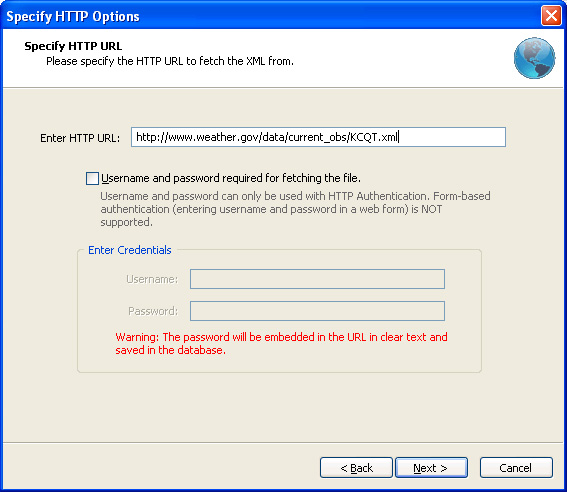
Enter the full URL to the XML file in the Enter URL text field.
If you need to specify a user name and a password to access the file, select the Username and password required checkbox, and enter the user name and password.
The following types of authentication are supported in the current version. The software selects the most secure method depending on the remote web server support.
- HTTP Basic Authentication sends user name and password over the network in plain text. Widely supported by web servers.
- HTTP Digest Authentication is a more secure way of authentication in which the password is not sent as plain text.
Note 1: Please note that form-based authentication is NOT supported. Form-based authentication means any web site where you enter the username and password into a form to gain access.
Note 2: Though the password is not shown when you enter it in the Password box, the user name and password are embedded in the URL and stored in plain text in the database.
Click Next to begin downloading the file from the Web server.
Argon DataViz
Create Pivot Tables and Pivot Charts from Large Datasets.
Swift XML Converter
Query & extract XML data into Microsoft Excel (XLS), Microsoft Access (MDB or ACCDB), or CSV.
Exult Standard
Convert XML into Microsoft Excel (XLS), Microsoft Access (MDB or ACCDB), or CSV.
Exult MySQL
Import XML data into automatically created MySQL tables.