
Convert XML to Excel, Access and CSV
Exult XML Converter helps you shred XML data and export it to Microsoft Excel (XLS), Microsoft Access(MDB or ACCDB) or CSV.
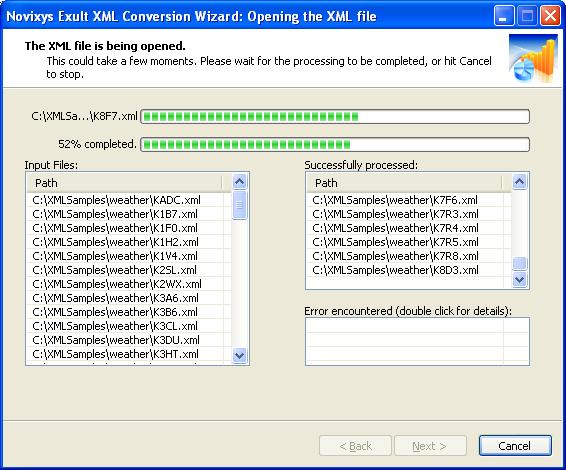
Processing multiple XML files using Exult
(Click for a larger view).
- Automatically figures out relationships: Data tables are created with parent - child relationships mirroring the XML structure.
- Extract only the data you are interested in: After the XML file is loaded, you can preview the data and select the tables you want to export.
- Merge data from multiple XML files: Merge and extract the data from multiple XML files. Smart parsing will ensure the data will be merged according to the XML file structure. View a HOWTO.
- Supports multiple export formats: Export data to Microsoft Excel (XLS), Microsoft Access (MDB or ACCDB), Comma-Separated Values(CSV), HTML or Text.
- Looking for batch conversions? Use the included command-line program to set-up automated conversions.
- Easy to use: With a familiar Wizard interface, extracting data from XML files could not be easier! No need to struggle with XSL stylesheets.
- Import XML data from Web URLs directly: Exult can connect to a remote site and fetch the XML data directly without a separate download step. Very convenient for automation using the included command line! Check out an example.
Looking for more powerful XML processing?
Try out Swift XML Converter or view a comparison of the two products.
HOWTOs
- HOWTO: Convert XML to Excel.
- HOWTO: Convert XML to Access (MDB or ACCDB).
- HOWTO: Merge data from multiple XML files and extract to Microsoft Excel.
- HOWTO: Use the command line to convert XML file to CSV.
- HOWTO: Convert XML from Web URLs to Excel.
Output Compatibility
Output created by the Exult XML Conversion Wizard is compatible with the following:
| Output Type | Intended for | Versions |
|---|---|---|
| XLS | Microsoft Excel |
Microsoft Excel 2007 Microsoft Excel 2003 Microsoft Excel 2002 Microsoft Excel 2000 Microsoft Excel 97 |
| MDB | Microsoft Access |
Microsoft Access 2007 Microsoft Access 2003 Microsoft Access 2002 Microsoft Access 2000 Microsoft Access 97 |
| ACCDB | Microsoft Access |
Microsoft Access 2007 |
| CSV | Database | Compatible with most database loaders. |
| HTML | Web | Compatible with all Web Browsers. |
| TEXT | General | Notepad, Wordpad, etc. |
System Requirements
| Hardware | Pentinum II and later. | Operating System |
Windows 7 Windows Vista Windows XP Windows Server 2003. Windows 2000 |
|---|---|
| Software |
Microsoft Data Access Components (MDAC) version 2.5 and later. Note: All Windows version starting with Windows 2000 include MDAC 2.5 or later. For exporting to Microsoft Access 2007 or later, the Access Database Engine must be installed. |
Installation
- Download the Setup file and save it to a folder.
- Once the download completes, click the saved file to run it.
- Follow the on-screen instructions to complete the installation.
Product Documentation
Try Novixys Exult XML Conversion Wizard Risk Free
You are welcome to use the Novixys Exult XML Conversion Wizard in trial mode for 14 days. During the trial period, approximately 50% of the information within the XML file is converted. For full conversion, upgrade to the registered version. The trial period expires within 14 days. You will need to purchase a license to use the software after 14 days.
Our Guarantee
The special pricing offer may not last, so you are encouraged to complete the purchase of a license soon. You can always return it for a refund within 30 days if you are not satisfied.
Bug fix upgrades are free for the lifetime of the product. We won't ask you to pay again for an upgrade if you find a bug in the version you have purchased.
When you purchase the Exult XML Conversion Wizard, you won't be caught purchasing an older version when a newer version is around the corner. You get free upgrades to the latest version for upto 90 days from the date of your purchase.
Safe & Secure
- We warrant that all our products including the Exult XML Conversion Wizard is free from Adware, Spyware, Malware, Viruses, Key Loggers or Trojans.
- We sign all our executables. For your safety, please ensure
that you install ONLY executable setup files signed by
Novixys Software, Inc. (See picture for illustration.)
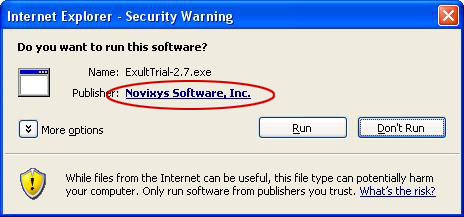
Internet Explorer warning on Windows XP
Argon DataViz
Create Pivot Tables and Pivot Charts from Large Datasets.
Swift XML Converter
Query & extract XML data into Microsoft Excel (XLS), Microsoft Access (MDB or ACCDB), or CSV.
Exult Standard
Convert XML into Microsoft Excel (XLS), Microsoft Access (MDB or ACCDB), or CSV.
Exult MySQL
Import XML data into automatically created MySQL tables.