
2.5.2 Updating XML Feeds
Once you have imported an XML file (or feed) into SQL server, you may want to update the data with a newer XML file. Typical scenarios include:
- Stock price XML feeds: You have a source of stock prices delivered in XML format. You have used Exult for SQL Server to import the data into SQL Server. Now you have newer XML files with updated prices. You can easily use Exult’s Update Feed functionality for this purpose.
- Weather XML feeds: You are using XML feeds from The National Weather Service to display the current weather for your region on your website (via SQL Server). For it to be of any use, it must be updated regularly. Use Exult’s Update Feed functionality to keep the weather updated.
- Currency Data feeds: You would like to import currency data feeds in XML format from XE.com into SQL Server for the purpose of consuming the data within an Enterprise Application. Using Exult’t Update Feed functionality, you can also keep the data easily updated.
To update data from one or more XML file or URLs, click Update in the XML File Selection Screen. A dialog box which allows you to select the XML files that have been imported into SQL Server is shown:
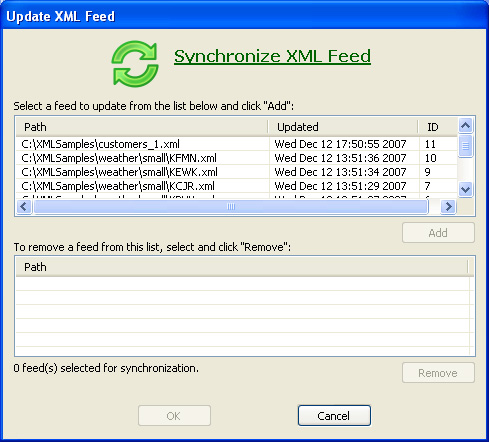
The top list shows the XML files that have been previously imported. Select an entry from this list and click Add. If the file contents are the same, you get a informational message and the file is not updated.
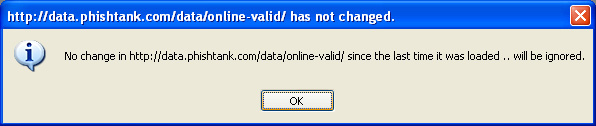
The check for an update works as follows: A SHA1 checksum is computed for the XML file (or URL) This checksum is compared with the value in the database. If the two checksums are the same, the selected entry will not be updated.
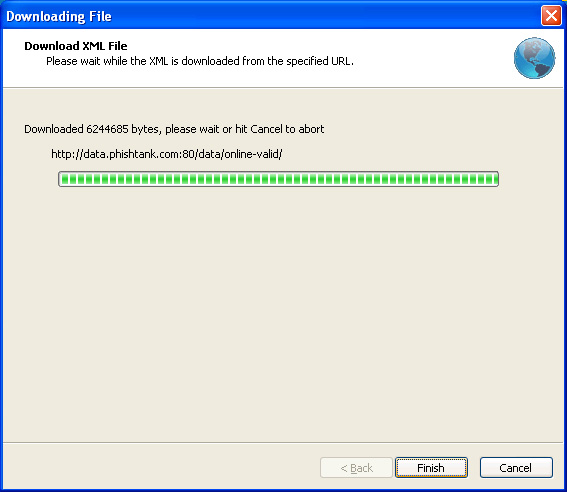
Updating XML data from URLs: When the XML file being updated is an URL, the file is fetched from the original source. The following screen pops up for confirmation. Click Finish to continue with the retrieval. This is to give you an opportunity to cancel the retrieval if the file could be large.
The following screen shot shows some XML file URLs which have been selected for update (and which have changed since the last import into the database.).
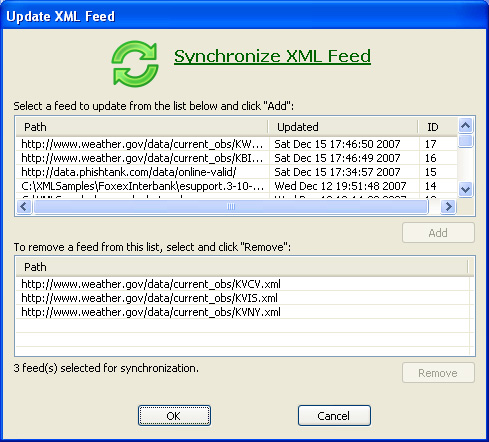
After selecting whatever XML files you want to update, click OK to return to the XML File Selection Screen.
Argon DataViz
Create Pivot Tables and Pivot Charts from Large Datasets.
Swift XML Converter
Query & extract XML data into Microsoft Excel (XLS), Microsoft Access (MDB or ACCDB), or CSV.
Exult Standard
Convert XML into Microsoft Excel (XLS), Microsoft Access (MDB or ACCDB), or CSV.
Exult MySQL
Import XML data into automatically created MySQL tables.